


OAN Live
3.3312.00 Reviews
App Specs
- Version
- Varies with Device
- Updated On
- License
- Free
- Downloads
- 50,000+
- Developer
- Herring Networks Inc.
- Categories
- News & Magazines
- Platform
- Android
Screenshots





 Analysis by AppCompare
I approach OAN Live as a watch-first way to follow news, rather than as a general-purpose reading library. That distinction matters: if I want a live broadcast I can put on while making breakfast, an app centered on viewing makes sense; if I want to compare several outlets’ reporting or skim a broad mix of written coverage, I would reach for a different kind of news app. Its focus is useful, but it also means I would treat it as one part of my news routine, not my only window on the day.
What kind of news routine suits it?
For me, the strongest use case is someone who already wants to follow One America News Network and prefers to watch or listen along rather than read a stream of headlines. A live program can provide context and continuity that a notification cannot. The trade-off is that video asks for more attention than a quick article, so I would not expect this to be the most efficient choice when I only have a minute between errands.
A realistic routine might be checking the app before leaving home, then returning to it later for a broadcast or a segment I missed. That is a more sensible way to fit viewing into a busy day than leaving a stream running whenever the phone is in use. If I am commuting, I would also consider whether I can safely and comfortably watch; a news app should never compete with attention needed for driving or crossing a street.
Choosing between a stream and a quick update
Compared with broad news aggregators, OAN Live has a narrower editorial focus. Aggregators are generally more useful when I want to scan different publishers, compare framing, or jump quickly between topics. A network’s own app is a better fit when I want that network’s live coverage in one place. Neither approach replaces the other, and I would use the choice that matches the question I have at that moment.
One practical tip is to decide before opening it whether I have time to watch. If I only need a quick check, opening a live stream can turn a short glance into a longer session. If I do want to follow a developing story, watching a segment and then checking another source for additional context is a more deliberate routine than relying on one feed alone. That distinction helps keep convenience from becoming an information bubble.
Data, attention, and viewing trade-offs
Live video is the central advantage, but it is also the main constraint. Streaming can use more mobile data and battery than reading text, especially during a longer viewing session. When I am away from Wi-Fi, I would keep sessions intentional and pay attention to my device’s data controls rather than assume video is lightweight. At home, a stable connection and a comfortable place to watch make the format much easier to enjoy.
Notifications can be useful for people who want a prompt to return to coverage, but I would keep alerts selective. Too many news interruptions can fragment a workday without helping me understand a story better. A good personal rule is to allow only alerts that genuinely change what I need to know, then open the app when I can give the coverage proper attention.
Worth Reading Before You Choose

EA SPORTS FC Mobile 26 Is a Bigger Football Game, but It Takes Time

Flipboard Shows What News Apps Must Do Beyond the Feed

Switching to Android Auto Means Rethinking Your Driving Routine

Google Calendar Makes a Crowded Week Easier to Manage

Ludo King Makes the Most of the Minutes Between Plans

Baby Panda World Brings Quick Play to Modern Phones, but Its Game Library Feels Busy
Who should look elsewhere?
I would skip this app if my priority is a neutral-feeling overview assembled from a wide range of publishers, a text-first reading experience, or a way to compare multiple accounts of the same event quickly. Those needs are better served by a general news reader and deliberate source-checking. It is also not an ideal fit if I have a tight mobile-data allowance and expect to watch video for long stretches away from Wi-Fi.
For a viewer who specifically wants OAN coverage, though, a focused app can reduce the steps between deciding to watch and reaching a broadcast. The key question is not whether a single app can cover every news habit, but whether this one’s channel-centered approach matches mine. I would use it for the coverage I came looking for and keep other sources available for breadth and comparison.
Before installing, I would also consider the practical basics: the app is free to download, is rated Everyone 10+, and lists optional in-app purchases at $5.99 per item. That makes it worth checking any purchase prompt carefully if I only intend to watch without paying. It is published by Herring Networks Inc., sits in the news and magazines category, and has an average rating of 3.5 from 556 ratings, with 50K+ installs. Those figures suggest an established audience, while the rating is a reminder that experiences are not uniformly positive.
The app was released on March 9, 2022, and supports Android 5.0 or later. That minimum makes it accessible to some older Android devices, but an operating-system threshold does not guarantee that every older phone will handle current video smoothly. On an older handset, I would close other demanding apps, use a reliable connection, and give the stream a short test before settling in for a long viewing session. Those simple steps are more useful than assuming a device will behave like a newer one.
Have you ever felt the need to stay updated with the latest news, but found yourself overwhelmed by the sheer number of sources out there? Well, that's where OAN Live comes in. I recently got my hands on this app and let me tell you, it’s like having a personal news curator right in your pocket.
Getting Started with OAN Live
First things first, downloading OAN Live was a breeze. Available on both Android and iOS, it took me just a few taps to get it up and running. Once installed, the app greeted me with a sleek and intuitive interface. No confusing menus or overwhelming options—just straightforward navigation that even my tech-challenged grandma could handle.
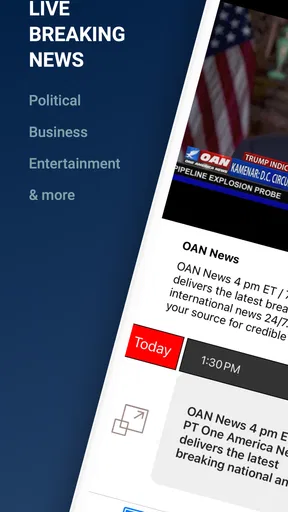
Upon opening, I was prompted to customize my news feed. This feature is a game-changer! You can choose from a wide array of categories like politics, business, sports, and entertainment. This meant I could tailor the content to suit my interests, skipping over topics that usually make my eyes glaze over.
Features that Stand Out
One of the aspects that truly impressed me was the live streaming feature. Unlike other news apps that bombard you with endless articles, OAN Live allows you to watch live broadcasts directly from the app. Whether I'm chilling at home or on the move, I can tune in and get the latest updates in real time.
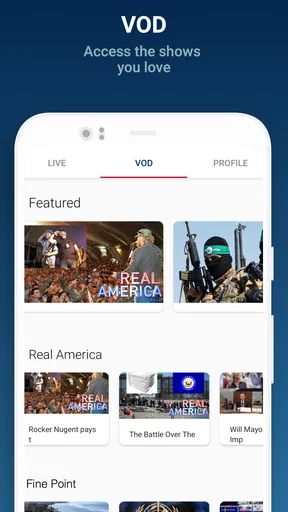
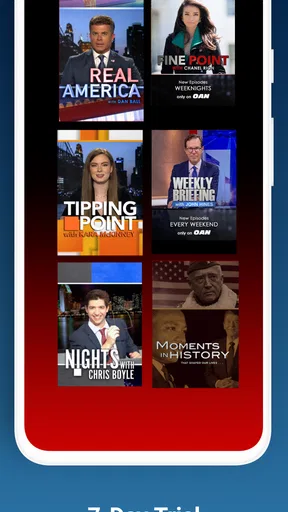
Another neat feature is the video on demand section. If you miss a live broadcast, no worries! You can access previously aired segments at your convenience. This kind of flexibility is perfect for someone like me who’s constantly juggling a busy schedule.
The app also does a great job in delivering notifications. I was able to set alerts for breaking news, ensuring I never missed out on important headlines. And the best part? The notifications weren’t intrusive, allowing me to maintain my sanity without constant buzzing interruptions.
Performance and Usability
When I judge a live news app, speed is less about how quickly a screen opens and more about whether I can get to the coverage I want without wrestling with the interface. A lightweight text headline can load under conditions that would interrupt video, so I would not use a smooth menu as proof that every stream will behave the same way. For a quick check, the useful test is whether I can find the live option promptly; for a longer watch, the connection matters more than the number of taps.
Heavy-use moments expose the real trade-off. If I keep a broadcast on while switching between apps, taking calls, or moving through areas with uneven reception, interruptions are more likely than during a short, settled viewing session. I would avoid treating a stream as background audio unless that suits the way I use the phone, and I would pause it when I no longer need it. That saves attention as well as mobile data and battery.
If playback stalls, I would first check whether the connection has changed, then return to the stream rather than repeatedly tapping controls in a hurry. Switching from mobile data to Wi-Fi, or vice versa, can make a difference to a live video session. I would also keep the app reasonably current through the normal app-store update process; with streaming, a stable connection and a device with available resources are practical parts of reliability, not just the app itself.
Now, let’s talk about performance. I’ve used some apps that lag or crash at the worst possible moment, but OAN Live isn’t one of them. It runs smoothly, and I didn’t experience any hiccups during my time with it. The video quality is top-notch, and even on a spotty internet connection, the streams remained relatively stable.
Navigation is seamless, with intelligently placed icons and clear labels. Even when diving deep into sub-menus, I never felt lost. It’s evident that a lot of thought went into the user experience, making it a joy to use on a daily basis.
Final Thoughts
On an older or entry-level phone, I would judge the experience by a short trial rather than by the minimum Android requirement alone. Video can be more demanding than reading, and an operating-system version does not tell me how much free storage, memory, or battery health a particular device has. If the phone gets warm, drains quickly, or struggles while other apps are open, shorter sessions or Wi-Fi viewing are more sensible than leaving a broadcast running for a long stretch.
My overall performance verdict is that the app’s design is most appealing when I can give its video a stable connection and a little attention. I would not choose it for a low-data situation or for a phone that already struggles with streaming. For a compatible device and a viewer who wants OAN’s live coverage, the direct route to viewing is the practical benefit; the network and connection remain the parts I would watch most closely.
In a world where information overload is all too common, OAN Live stands out as a beacon of clarity. It offers a personalized news consumption experience that’s both engaging and accessible. Whether you’re a news junkie or just someone trying to stay informed, this app has something for everyone.
So, if you’re on the lookout for a reliable source of information that fits neatly into your lifestyle, give OAN Live a try. It’s more than just an app; it's your gateway to the world, condensed into a user-friendly platform. Trust me, once you start using it, you’ll wonder how you ever got by without it.
Pros
- High-quality live streaming options.
- User-friendly interface with easy navigation.
- Wide variety of news coverage.
- Frequent updates ensure reliability.
- Supports multiple devices seamlessly.
Cons
- Limited offline content availability.
- Some reports of minor app crashes.
- Requires stable internet connection.
- Occasional ads during live streams.
- Limited customization for notifications.
FAQs for OAN Live
What is OAN Live and what features does it offer?
OAN Live is a streaming app that provides users with access to live news, political commentary, and current events from the One America News Network. The app offers features such as live broadcasts, video on demand, and a user-friendly interface that allows easy navigation and quick access to trending news topics.
Is OAN Live available on both Android and iOS devices?
Yes, OAN Live is available for download on both Android and iOS platforms. This ensures that users can access the app whether they have a smartphone or tablet running on either operating system, providing flexibility and convenience for a wide range of devices.
Does OAN Live require a subscription or is it free to use?
OAN Live offers both free and subscription-based content. While users can access some features and news for free, a subscription may be required for full access to all content and exclusive features. This subscription model helps support continuous content creation and app improvements.
How frequently is the content updated on OAN Live?
The content on OAN Live is updated continuously to provide users with the latest news and information. Live broadcasts and breaking news are available as they happen, ensuring that users have access to up-to-date coverage of significant events and developments around the world.
Can I customize my viewing experience on OAN Live?
Yes, OAN Live allows users to customize their viewing experience by selecting favorite topics and creating personalized watchlists. This feature enhances user engagement by allowing individuals to tailor their news consumption to match their interests and stay informed about specific areas of interest.


